
Is this photo calorie counter right for you?
Photo logging can help when you have a visible plate to record and do not want to describe every item first. FuelForm runs in its iPhone and iPad app, with iOS or iPadOS 17 or later. Sign in to your FuelForm account before opening Home. This website explains the workflow; it does not have a food-photo uploader or browser calorie calculator.
The app is free to download, with optional Pro subscriptions. Free access includes limited photo analysis, today's diary and meal editing. Pro provides more AI access and features including barcode logging and complete History, with usage limits. Check your available access and Apple's purchase terms in the app or the App Store listing. If you are choosing a photo app, our FuelForm and Cal AI comparison covers their documented features and access.
About the screenshots: these are native FuelForm interface components captured in an isolated iPhone Simulator preview with a real sample meal photograph and supplied demonstration values. They show controls and local preview behavior. The example nutrition is not an AI response, measured nutrition, a recommendation or proof of production-account saving or cloud sync.
How to scan food for calories in FuelForm
Follow the meal from its photo to a record you can review:
- In Home, tap Photo in the meal-entry controls. This opens the camera view. Photograph your serving, or open the photo-library icon, labelled Photo Library for accessibility, to select pictures already on your phone. If the camera is unavailable, use Choose Photos (up to 3).
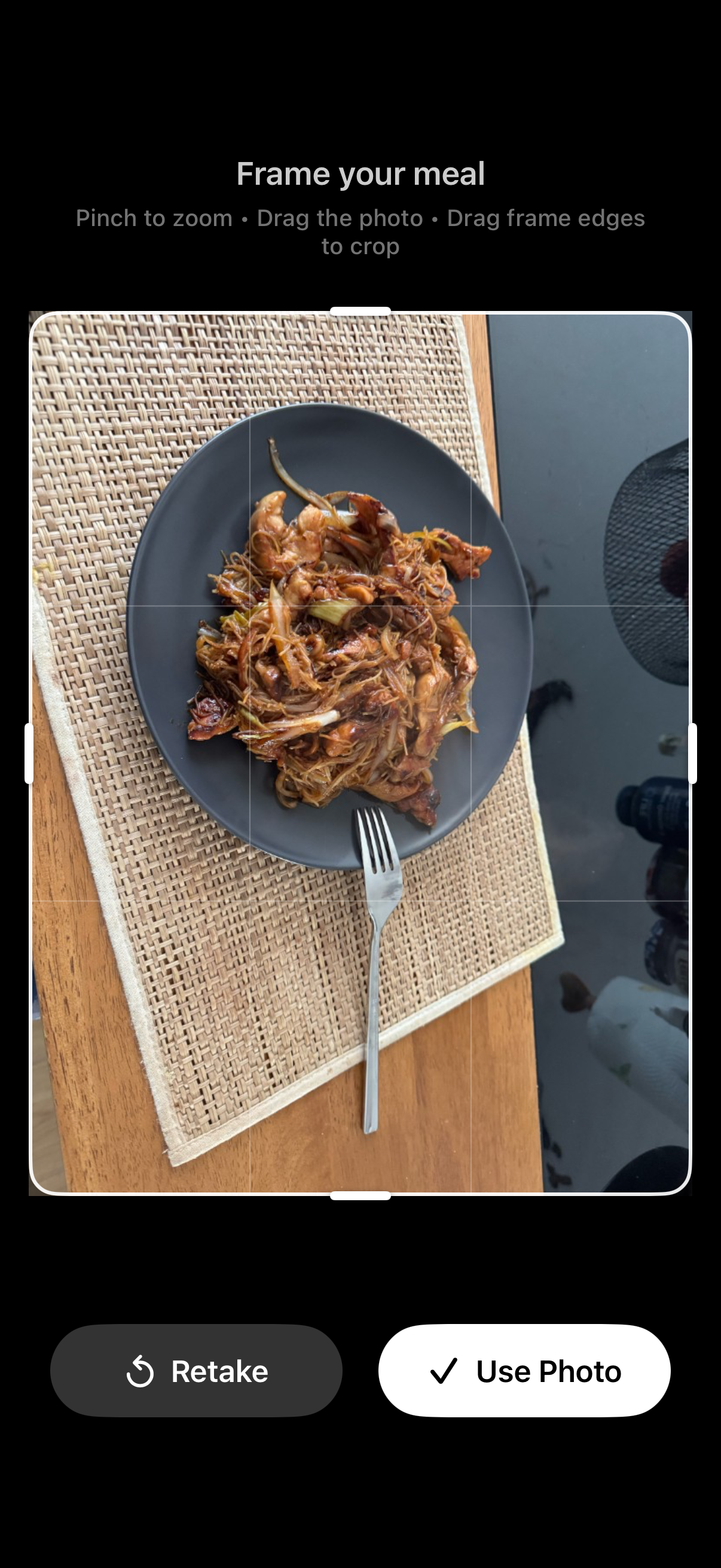
- For a single picture, check Frame your meal in the preview. Include the food you mean to log and keep it clear. Use Retake if the image needs replacing, or Use Photo when it is ready. Several pictures use a meal-photo preview with Use 2 Photos or Use 3 Photos. These controls prepare the attachment; they do not run the analysis yet.
- In the composer, use Add details (optional)… for information the picture cannot show. Include a known portion, cooking oil, a sauce, or the share of a larger dish you ate. Tap the send arrow, labelled Send meal description for accessibility.
- Complete any required AI Data Processing consent and access prompts. Wait for the analysis to return before treating the description or attachment as a completed record.
- Open the returned meal and check its food, ingredients and quantities. For an ordinary completed meal, tap its card to open Food Details, then Edit when something needs correction. A flagged result uses its review prompt and opens Edit Entry; it should be resolved before you interpret its contribution to totals.
- When editing, review the fields and tap Save when they reflect the information you have. Then check the diary; if the completed estimate needed no change, check its existing record. Confirm the meal appears on the intended day and once. If the app reports a failure or still requests review, resolve it before interpreting recorded intake.
The following screens show what to look for at those stages.
Frame the serving, then add useful details
The sample photograph shows a plate of noodles. Use Photo keeps the selected image for your meal description. FuelForm accepts up to three library pictures for one meal. The multiple-photo preview identifies them as One meal, 2 photos or One meal, 3 photos; they are not separate diary entries.
Add facts you know before sending. For example: “Noodle stir-fry for lunch. One plate; oil and sauce amounts unknown.” If it was a shared dish, say how much you ate: “About half of the shared noodle bowl; sauce and oil amounts unknown.” These are caption examples, not measurements of the pictured meal. If you weighed the serving or know the recipe, state those details instead. Do not invent weights to make the description look precise.
Keep three things separate: the amount shown, the amount you ate, and what the amount describes. A photo of the whole bowl does not mean you ate the whole bowl. A weight for a mixed plate does not establish the weight of its noodles, chicken and vegetables separately. Say whether a known weight was measured raw or cooked. For a shared recipe, allocate known oil to your serving once; do not add the whole recipe's oil again. The worked meal-description example shows that distinction across measured foods, estimated vegetables and shared cooking oil.
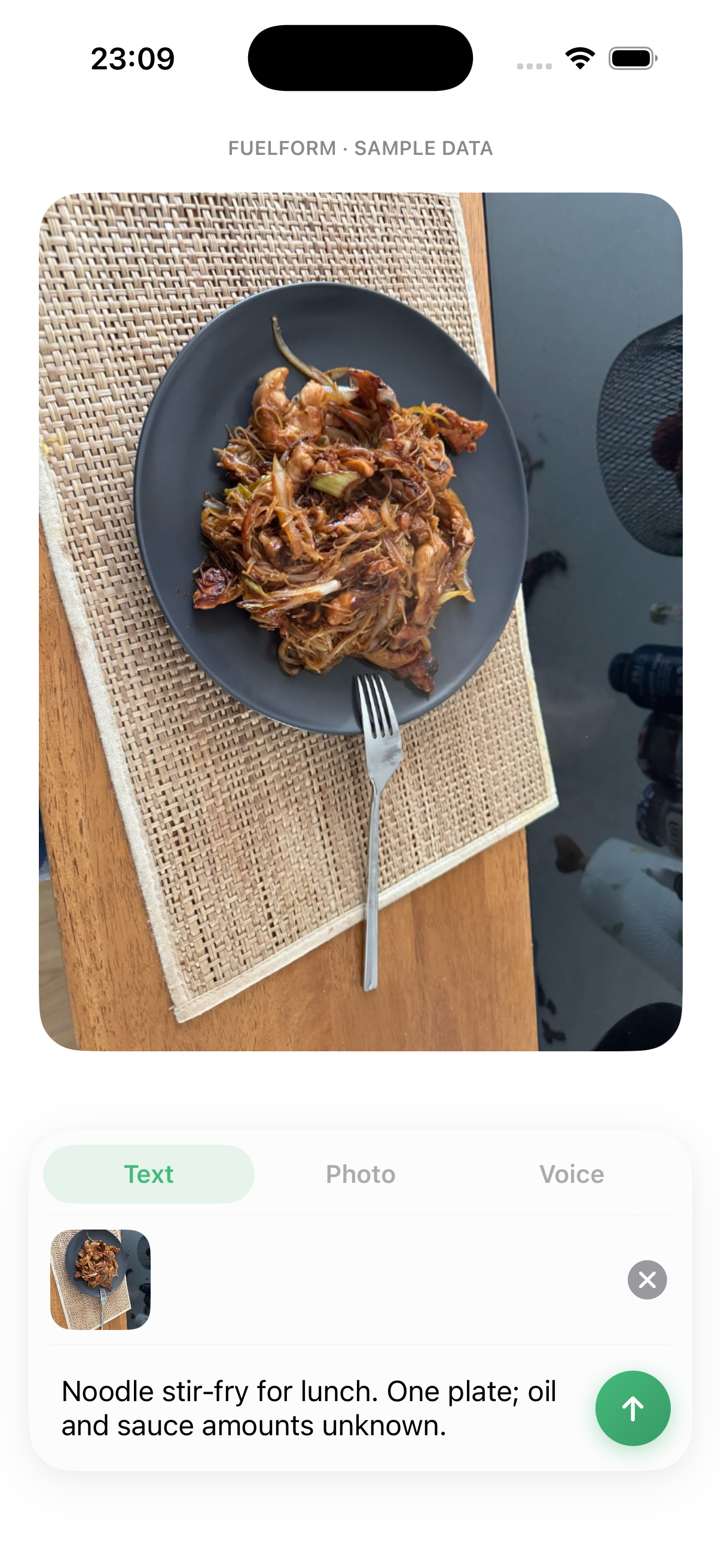
A close-up can make foods easier to inspect, but it cannot establish the plate's depth, ingredient weights or oil absorbed during cooking. A shared platter also needs an explanation of your share. Our food-logging checklist covers food, amount, preparation and additions across input methods.
Review the food breakdown and edit the record
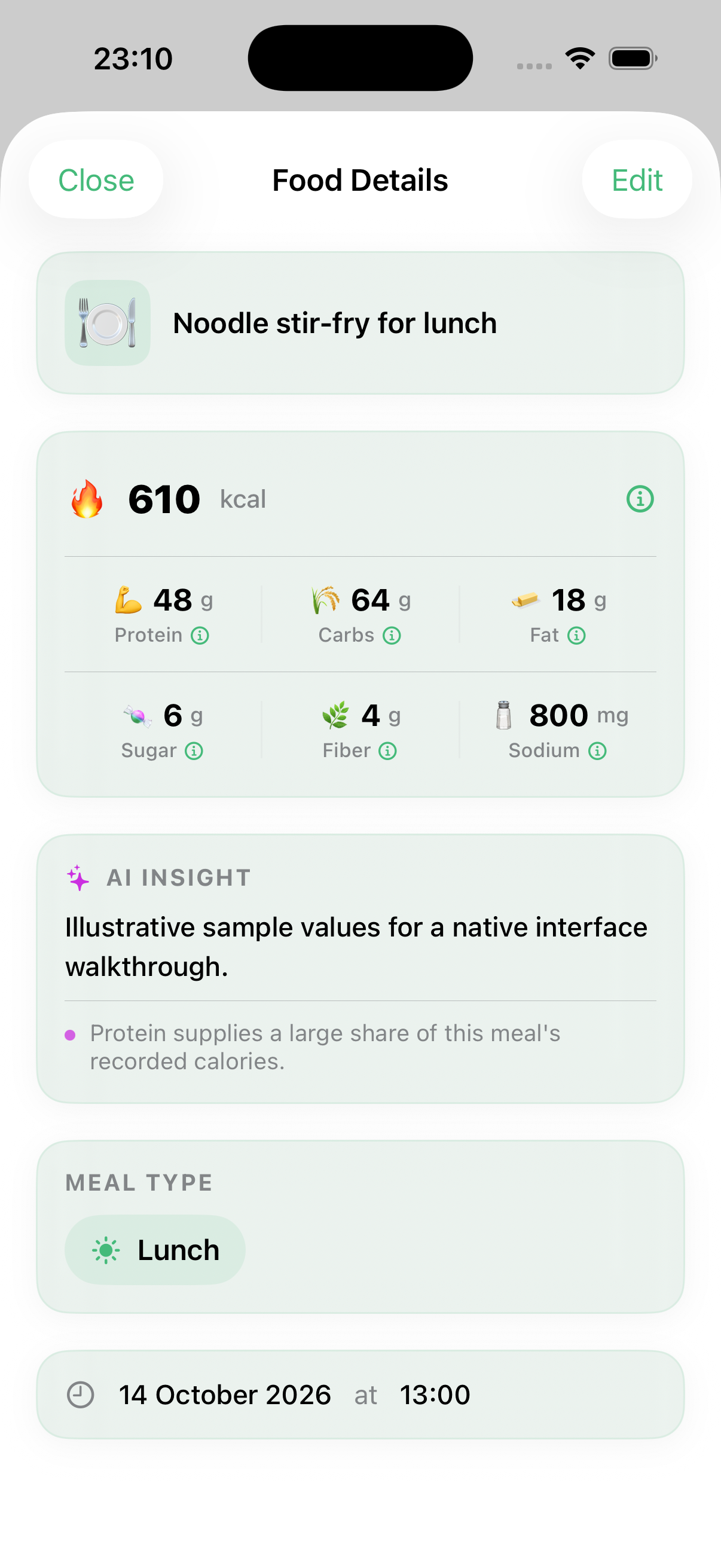
The Noodle stir-fry for lunch detail preview uses illustrative values of 610 Calories, 48 g protein, 64 g carbs and 18 g fat. Those numbers were supplied for this local interface demonstration. They are not a nutritional assessment of the photographed noodles and should not be copied into your diary.
Check these four things in your own returned estimate:
- Food identity: does the name describe the actual dish? A noodle meal with chicken is different from one with tofu or no added protein.
- Portion: do the amount and units describe what you ate? The full bowl and half the bowl are different records.
- Preparation and additions: is cooking oil, sauce, dressing, a drink or a side missing?
- Evidence: do you have a package label, a measured amount, recipe details or official menu information to check the values?
From Food Details, choose Edit to open Edit Entry. The nutrition controls include Calories (kcal), Protein (g), Carbs (g) and Fat (g). A change to Calories can also adjust the displayed nutrients locally, so check all the values before tapping Save.
Numeric and portion corrections can follow a different path from changing the food or ingredients: a change that needs fresh AI analysis can ask for consent or access again. Do not assume every correction works offline.
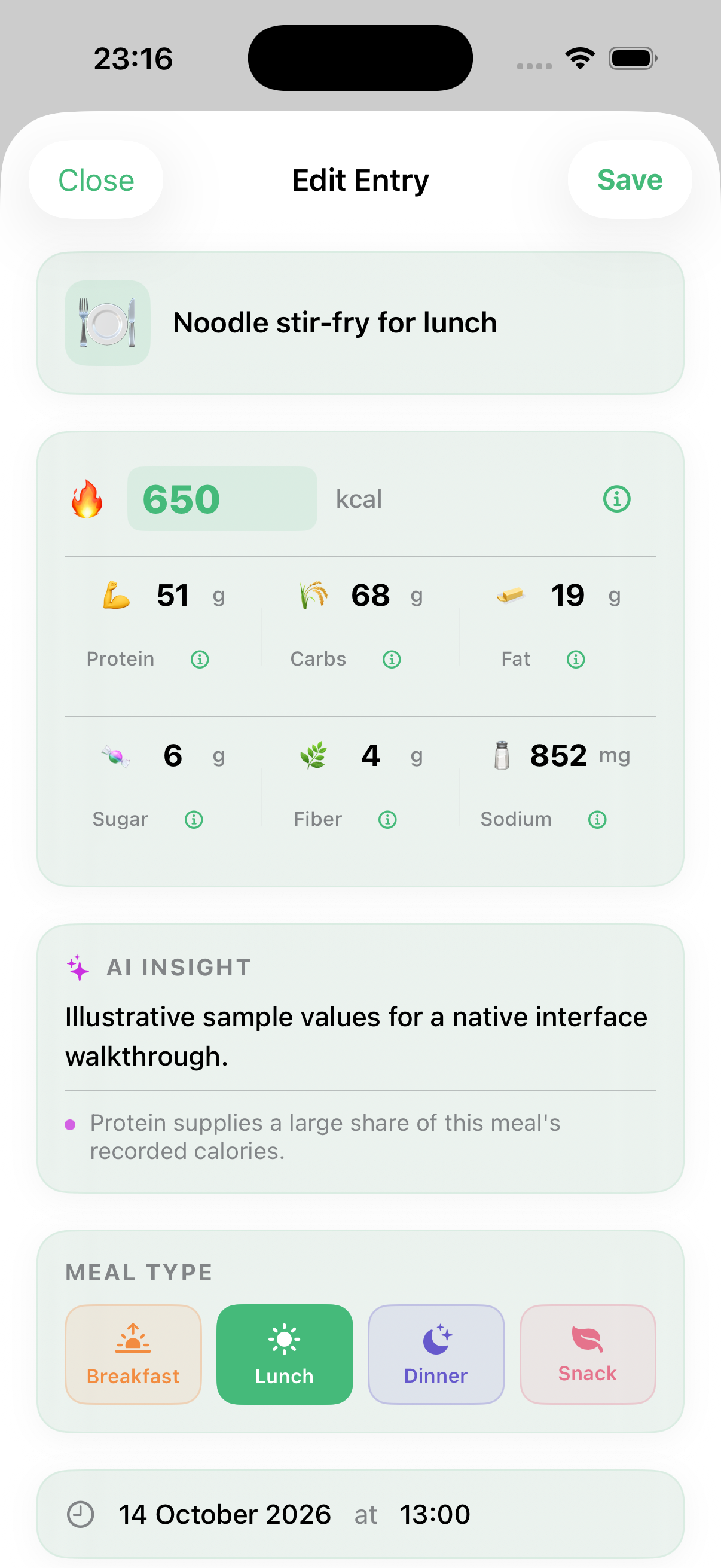
In the captured edit, we changed Calories from 610 to 650 and left the field. FuelForm adjusted the other displayed nutrient amounts locally. The main values became:
| Supplied sample field | Before the edit | After the calorie edit |
|---|---|---|
| Calories | 610 | 650 |
| Protein | 48 g | 51 g |
| Carbs | 64 g | 68 g |
| Fat | 18 g | 19 g |
Calories
- Before the edit
- 610
- After the calorie edit
- 650
Protein
- Before the edit
- 48 g
- After the calorie edit
- 51 g
Carbs
- Before the edit
- 64 g
- After the calorie edit
- 68 g
Fat
- Before the edit
- 18 g
- After the calorie edit
- 19 g
This demonstrates linked field behavior using supplied values. No new AI analysis was run, and the changes do not establish the photographed meal's nutrition. When editing your own entry, check the displayed nutrients against the information you have before saving.
Correct a known portion without guessing the whole meal
Here is a separate quantity example: suppose you weighed 180 g of cooked noodles, but your returned entry lists 250 g of cooked noodles. It is not a measurement of the screenshot meal or a prediction of FuelForm's analysis.
Open Food Details → Edit and find the noodles ingredient in Edit Entry. Check that it describes the same food and preparation, then correct its amount from 250 g to 180 g. Only use this correction when 180 g was the noodles' weight. If it was the weight of the entire mixed dish, do not assign 180 g to the noodles alone.
Review the resulting Calories and macros: portion edits can rescale other values. Keep separately known sauce or oil information without counting those additions twice. If the food itself was wrong, correct its description or ingredients and follow any fresh-analysis prompts. Tap Save, wait for the edit to finish and check the meal on the intended day. Resolve any remaining review or error prompt before relying on its contribution to Eaten.
An ordinary completed estimate that needed no correction already has a record; checking it is different from editing and saving it. The next screen demonstrates a local save using supplied values, not a production-account result.
Check the saved calories and macros in your day
In the isolated preview, tapping Save closed the edit sheet and updated the local example record. The native Eaten summary then showed 650 Calories, 51 g protein, 68 g carbs and 19 g fat. It contained this one example meal, so its totals matched the record.
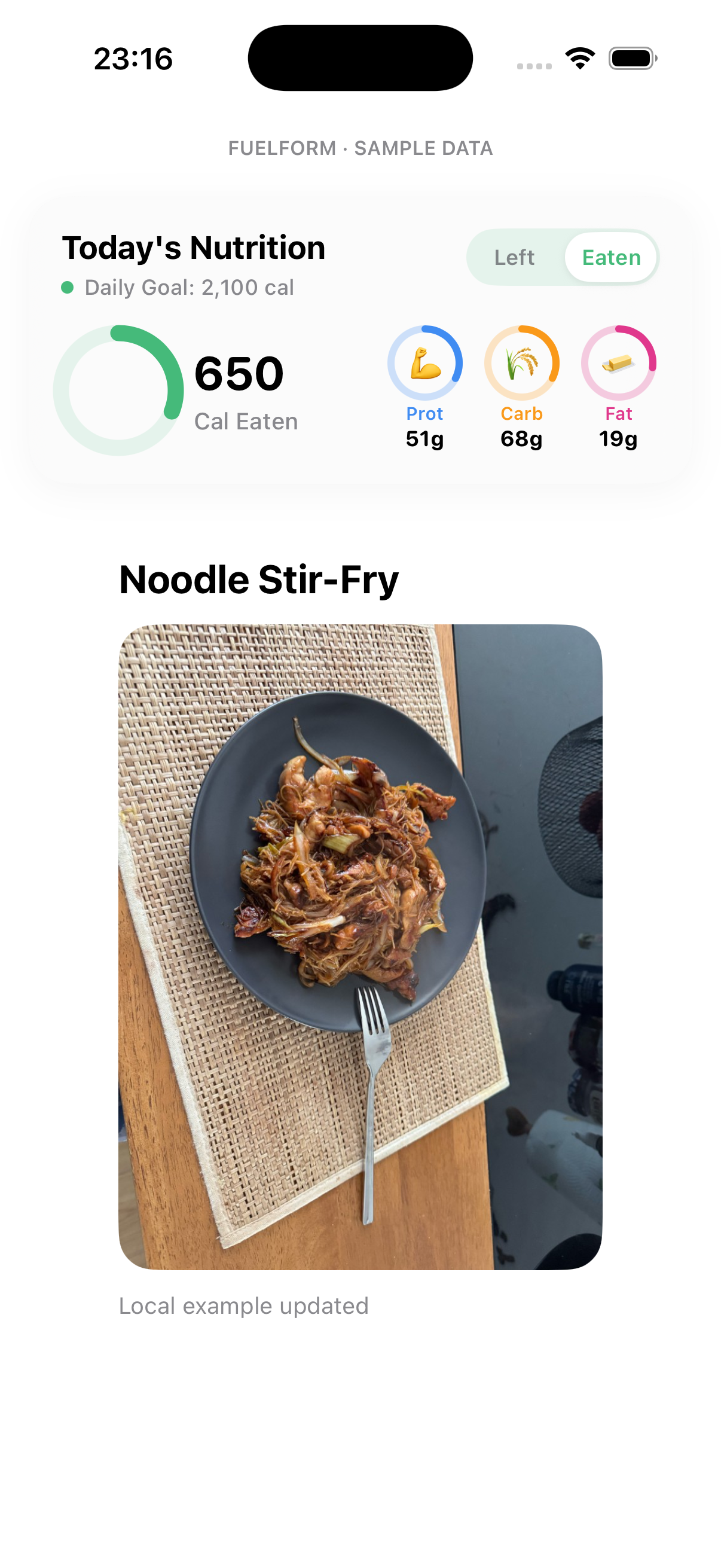
For your own diary, check protein, carbohydrate and fat in grams alongside energy, then compare the completed meal with your daily log. The macro tracker walkthrough explains FuelForm's Eaten and Left displays and how individual meals contribute to them.
A review flag, failed estimate or unfinished save can leave an entry out of recorded totals. A missing record also does not prove you skipped a meal. Resolve the app's review prompt and check the intended date before changing a daily goal to make the totals look different.
When a photo needs a label or known portion
To estimate calories from a picture, the app must infer some information. Preserve more specific evidence whenever you have it.
| Meal information | Useful starting point | What to check |
|---|---|---|
| A visible plate without a known recipe | Photo, plus the details you know | Main foods, your serving, hidden sauce and oil |
| Packaged food with a Nutrition Facts label | Label, or barcode when available | Exact product, serving basis and amount eaten |
| A recipe with known ingredient quantities | Text or voice description, plus your portion | Raw versus cooked quantities and your share of the recipe |
A visible plate without a known recipe
- Useful starting point
- Photo, plus the details you know
- What to check
- Main foods, your serving, hidden sauce and oil
Packaged food with a Nutrition Facts label
- Useful starting point
- Label, or barcode when available
- What to check
- Exact product, serving basis and amount eaten
A recipe with known ingredient quantities
- Useful starting point
- Text or voice description, plus your portion
- What to check
- Raw versus cooked quantities and your share of the recipe
For a simple illustrative label example, suppose a package lists 150 Calories per 30 g serving and you ate 60 g. That is two listed servings: 60 ÷ 30 = 2, and 150 × 2 = 300 Calories. A photo estimate that assumed one serving would describe a different amount.
Use those known facts to review your record; a mentioned label value is not automatically a confirmed app value. The FDA's Nutrition Facts guidance explains serving size and servings per container. Our label-reading guide shows what to check, and our voice calorie tracker guide shows how to describe known quantities.
How accurate is calorie tracking from a photo?
An AI meal scanner can recognize the right food and still estimate the wrong portion. Oil, fillings, preparation and ingredient proportions can be hidden. A plausible total or a detailed breakdown does not establish that the meal was measured.
FuelForm has no published independently validated accuracy percentage. This walkthrough demonstrates interface controls and review steps; it is not a controlled accuracy or speed comparison. Read how FuelForm estimates nutrition for the separate limits of recognition, portion assumptions and nutrition references. Our AI versus manual tracking guide helps choose the method that preserves the best information available.
Photo consent and troubleshooting
Photo analysis sends an image for AI processing. Review AI Data Processing consent before submitting. You can manage the choice in Settings → AI Data Processing; turning it off blocks new AI requests. The privacy policy explains the data flow and provider terms.
If a photo is not ready to use in your diary, check the stage that stopped:
- Camera unavailable: use the photo-library control, or another input method you can access. Camera and library permissions are different from consent to AI analysis.
- Attachment present but no result: Use Photo prepares the attachment. Check whether you added the intended details and sent the meal description.
- Consent or usage limit shown: follow the available choices in the app. Retrying a picture does not make a limited allowance unlimited.
- Wrong food or amount: use the detail/edit or flagged-review route, then check the saved record. Keep unknown quantities distinct from measured ones.
- Meal absent from totals: inspect review status, the date and whether the save finished, rather than assuming every photo already counts.
Common questions about photo calorie tracking
Can an app count calories from a picture?
An app can estimate foods and nutrition from a picture. It cannot measure every portion or see every ingredient. FuelForm's photo calorie counter gives you a meal record to review: check the food, amount, preparation and additions before relying on its total.
Can I track macros from a photo?
Yes. FuelForm estimates protein, carbohydrate and fat alongside Calories. Check those values against the identified foods and portion. The meal's macro amounts and its contribution to daily totals are separate checks; the macro guide shows how to read both.
Is FuelForm's AI food scanner free?
FuelForm is free to download and includes limited free photo analysis. Pro provides additional access and features, with usage limits too. Today's diary and meal editing are available in free access; barcode and complete History require Pro. Check your current allowance and purchase terms in the app before assuming a feature is unrestricted.
Can I use a food picture already on my phone?
Yes. Open Photo from Home, then use the photo-library icon labelled Photo Library for accessibility. If the camera is unavailable, use Choose Photos (up to 3). Choose Use Photo for one picture, or Use 2 Photos / Use 3 Photos for several. Add the known meal details and send the description. The selected pictures represent one meal.
Can I upload a food photo on this website?
No. FuelForm's photo analysis is in the iPhone and iPad app. This page is a guide, rather than a browser upload tool or calorie calculator. The App Store link shows supported devices and current purchase terms.
What if the photo calorie estimate uses the wrong portion?
Check the amount against what you ate. Use a known weight, a label's serving information, recipe quantities or your share of the dish when available. Open the result's edit or review route, make the supported correction and save. If the portion is still unknown, keep the result as an estimate rather than treating a changed number as a measurement.